Course Map
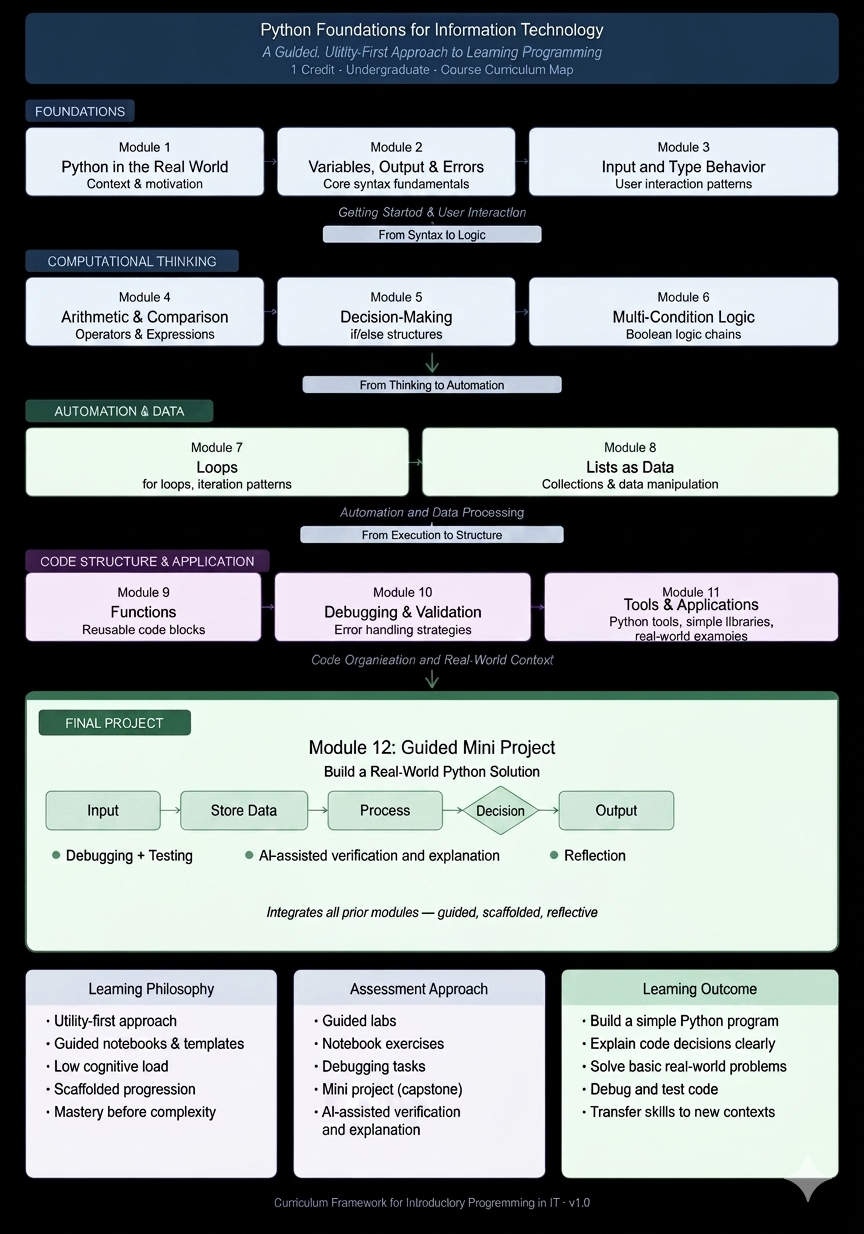
This map shows how the notebooks fit together. It is useful for instructors, students who want a big-picture view, and anyone reviewing the course structure.
The course includes a getting-started notebook followed by Modules 1-12.
Module Map
| Module # | Module Name | Notebook File | Key Concepts | Skills Developed |
|---|---|---|---|---|
| 0 | Getting Started | notebooks/00_getting_started.ipynb |
Notebook workflow, running cells, checking output | Open notebooks, run code, build confidence |
| 1 | Python in the Real World | notebooks/01_python_in_the_real_world.ipynb |
What Python is, practical uses, simple examples | Connect Python to real-world IT tasks |
| 2 | Variables, Output, and Errors | notebooks/02_variables_output_errors.ipynb |
Variables, print(), basic error awareness |
Store values, display output, notice simple mistakes |
| 3 | Input and Type Behavior | notebooks/03_input_and_type_behavior.ipynb |
input(), strings, numbers, type conversion |
Collect user input and prepare values for calculations |
| 4 | Arithmetic and Comparison | notebooks/04_arithmetic_and_comparison.ipynb |
Math operators, comparison operators, order of operations | Calculate totals, compare values, check results |
| 5 | Decision Making | notebooks/05_decision_making.ipynb |
if, if-else, decision rules |
Write programs that choose different actions |
| 6 | Multi-Condition Logic | notebooks/06_multi_condition_logic.ipynb |
Multiple conditions, and, or |
Build simple rules with more than one condition |
| 7 | Loops | notebooks/07_loops.ipynb |
Repetition, for loops, range() |
Repeat actions and trace loop output |
| 8 | Lists as Data | notebooks/08_lists_as_data.ipynb |
Lists, indexing, processing several values | Store related data and process it with loops |
| 9 | Functions | notebooks/09_functions.ipynb |
Function definitions, calling functions, reusable steps | Organize repeated logic into simple functions |
| 10 | Debugging and Validation | notebooks/10_debugging_and_validation.ipynb |
Error messages, testing, validation | Find mistakes, test changes, improve reliability |
| 11 | Python Tools and Applications | notebooks/11_python_tools_and_applications.ipynb |
Light exposure to dictionaries, libraries, and next steps | Recognize additional Python capabilities without a mastery expectation |
| 12 | Guided Mini Project | notebooks/12_guided_mini_project.ipynb |
Program workflow, integration, testing, reflection | Build and explain a small complete program |
Optional Teaching Supports
Before continuing to Module 7, an instructor may replace Module 6's end reflection with the mid-course check-in, retaining its real-world logic question. The peer exchange or solo equivalent can replace the Comparing AND vs OR practice segment. Stretch prompts are optional after the named lesson; they add no learning objectives or full-credit requirements. See the instructor guide for time budgeting and substitution details.
OER Outcome Mapping
The author-written OER learning outcomes are the shared reference. This map describes the materials, not alignment certified by a university. Module objectives are unchanged.
| OER outcome | Supporting modules | Existing evidence of learning |
|---|---|---|
| 1. Read and predict | 0–10 | Predict-before-running prompts, output explanations, and tracing examples |
| 2. Build small programs | 2–8, 12 | Guided changes, mini labs, and the small project |
| 3. Organize repeated tasks | 9 | Define and call a simple function with a parameter |
| 4. Test and explain changes | 2–10, 12 | Intentional-error practice, testing, and the project Fix Log |
| 5. Apply and reflect | 1, 4–10, 12 | Real-world connections, reflections, and project explanation |
Module 11 offers light exposure rather than additional mastery requirements. Functions are practiced in Module 9; this map does not add a function requirement to the final project. Adopters supply their own institutional alignment separately.
Progression Summary
The course moves from basic notebook use to practical program building:
- Start by running notebooks and reading output.
- Store information with variables.
- Get input and handle basic type behavior.
- Calculate and compare values.
- Make decisions with conditions.
- Repeat actions with loops.
- Store and process multiple values with lists.
- Organize code with simple functions.
- Debug, test, and validate work.
- Combine course skills in a guided mini project.
The final goal is not advanced programming. The goal is for students to read, run, modify, test, and explain small Python programs with confidence.