Lab 4: Lifecycle and lineage
Outcomes: SLOs 2,4. Estimated time: 60–90 minutes; allow additional time for documentation startup and support. Environment: your dedicated local course database. Synthetic data only.
At a glance
| Before starting | Lab 3 |
|---|---|
| You will run | Generate documentation and inspect lineage in your browser. |
| You will write | One prediction, two checked paths, one dependency explanation, three stage responses and three retention answers in one log. |
| Done when | Technical checks pass and your decision log is complete, including evidence and limitations. |
| Safe stopping point | After a completed section; save your draft before closing the editor. |
| Submission format | Submit the private lifecycle decision log; do not also complete the shared template. |
Follow the steps below in order. Keep configuration, generated logs and submissions private. Return to the required course path when this lab is complete.
Why this lab matters
When a source record changes or is removed, the reports built from it may also need to change. A data administrator must know where data goes, which copies could remain and what evidence would confirm that a change reached its destination.
In Lab 3 you built and checked sales models. In this lab you follow the connections between those models and explain a retention scenario. These connections are called lineage. You will use supplied documentation to make a lifecycle decision, rather than assume that changing a source automatically changes every copy.
Learning objectives
These instructor-developed lab objectives support SLOs 2 and 4. By the end of this lab, you should be able to:
- Trace the supplied order data from its raw source through staging and core models to the reporting marts using generated documentation or a written path.
- Explain why a view and a stored table can respond differently to a source-data change, and identify downstream copies to investigate in a retention scenario.
- Complete a lifecycle decision log connecting each stage to its transformation, quality check, permitted role and supporting evidence.
- Distinguish a documented dependency from evidence that access restrictions or deletion requirements have actually been enforced.
Skills you will practice
- Generate and navigate local dbt documentation using the supplied commands.
- Read model dependencies and describe what one row represents at each stage.
- Reason about refresh and retention responsibilities without deleting course data.
- Record a proposed action, its evidence needs and its limitations clearly.
No prior experience with lineage tools is assumed. A dependency means that one model uses another source or model. A DAG is a diagram of these directed connections without circular paths. You may describe the same connections in text; you do not need to draw a diagram or write a new pipeline for this lab.
What you will produce
- The relevant execution results from the Lab 4 runner.
- Two source-to-report lineage paths, shown in text or an optional screenshot.
- A completed lifecycle decision log, including your explanation of which downstream copies might remain after a source record is removed and what you would investigate or refresh.
- An explanation of one action the lineage diagram cannot prevent and one limit of your evidence. The retention scenario is a reasoning task, not an instruction to delete records.
The decision log is your complete Lab 4 submission. It includes spaces for your execution evidence, prediction and assistance disclosure. You do not need to complete the general submission template separately.
Terms you need for this lab
| Term | Meaning here |
|---|---|
| Materialization | How dbt creates a model in the database: here, a view or a stored table. |
| Refresh / rebuild | Recompute stored results. Removing a raw row does not automatically update a downstream stored table. |
Use the glossary for more detail; this is reference support, not another assignment.
Concept
Lineage records dependencies: changing a raw source can affect several downstream models. dbt’s manifest and local documentation expose these relationships. A dependency edge describes transformation structure; it does not prove authorization or retention.
Views read underlying data when queried. Materialized tables hold copies until rebuilt or changed. Deleting a source record therefore does not imply deletion from every materialized downstream model, export, backup or AI training set. Trace each copy, its owner, refresh behavior and evidence of deletion in the lifecycle decision log.
Separate acquisition, validation, transformation, permitted use, sharing, retention and retirement. At each transition ask who approves the change and what evidence would demonstrate it. Do not label a proposed control as implemented because it appears in a diagram.
Check your understanding: the retention scenario in investigation step 4 asks you to distinguish a source change from verified downstream removal. Optional Lab 8 extends this reasoning to a simulated restore and deletion ledger.
Completion: Automation passing means the selected technical checks passed. Complete the independent investigation, interpretation and evidence below before submitting.
Before you begin
We recommend completing Lab 1, Lab 2 and Lab 3 first. They introduce the environment, governance decisions and sales models used here. These are earlier course activities, not assumed prior programming qualifications.
Use the same configured environment. You do not need to repeat setup or Lab 1's technical checks. If you are joining without an environment, follow Student start here. The Lab 4 runner rebuilds and tests the Lab 3 models before generating documentation; this is expected, including any saved tests you added during Lab 3.
Predict and run
Before running, write one or two sentences in your private notes predicting whether the runner should succeed or stop if the configured database login cannot authenticate. You do not need to predict an exact error message or change any settings. Later, copy this prediction into section 0 of your decision log. From the repository root in your Ubuntu terminal:
.venv/bin/python scripts/course.py lab 4
Expected output after completing Lab 3 with both added test files:
PASS: connection, dedicated database, schemas and non-superuser builder.
PASS: synthetic seed present (existing data preserved).
PASS: dbt build --selector course
PASS: 10 models and 39 data tests actually executed.
PASS: dbt docs generate
PASS: raw.orders -> stg_orders lineage present; documentation generated.
LAB 4 TECHNICAL CHECKS COMPLETE. Return to labs/core/lab04-lineage-lifecycle/README.md for interpretation and deliverables.
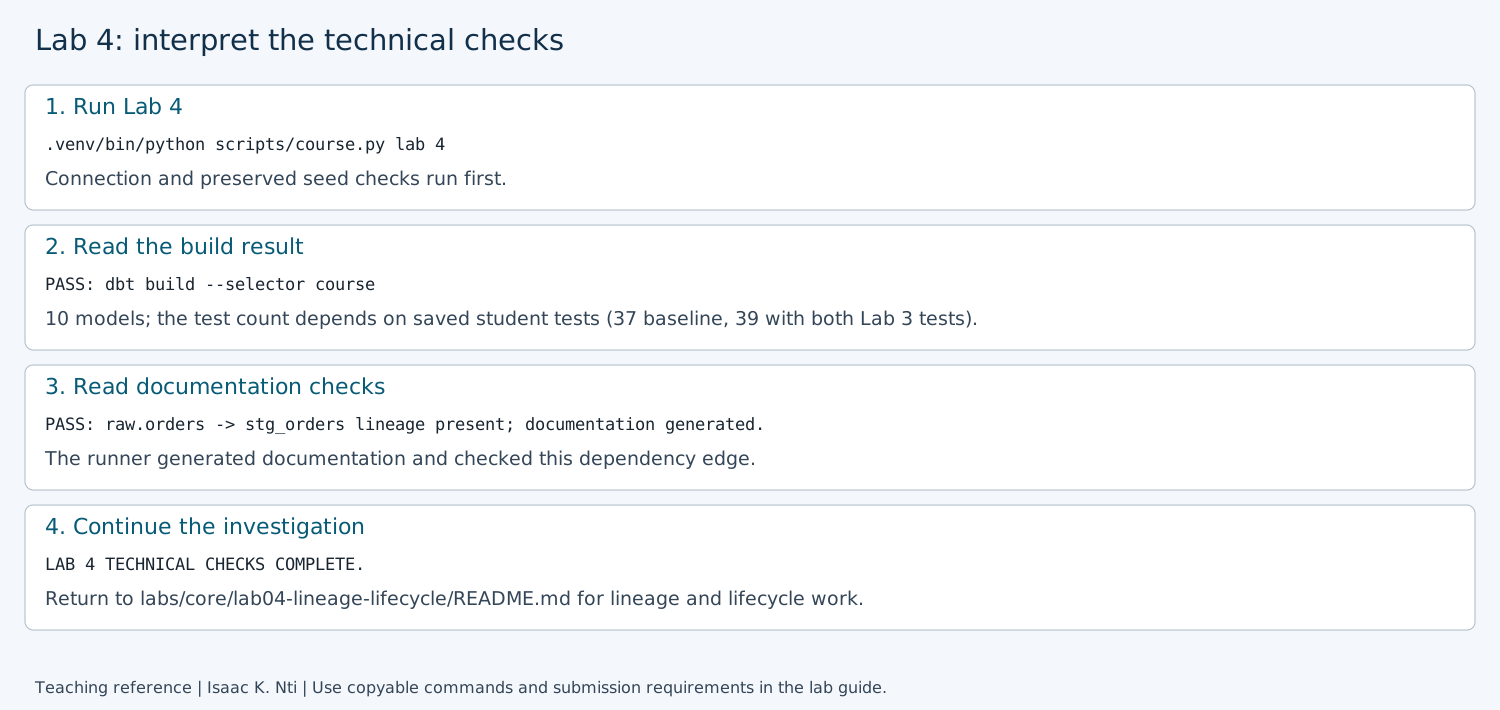
Annotated reference for interpreting output, not an execution screenshot. Use the command above for copying; the table below explains each result.
What these results mean:
| Result | What it confirms |
|---|---|
| Connection PASS | The connection, dedicated database, schemas and non-superuser builder checks passed. |
| Synthetic seed PASS | The existing course source data was preserved. |
| dbt build and model/test count | Lab 4 rebuilt the Lab 3 project and its selected tests passed. It is normal to see these checks again. |
| dbt docs generate PASS | dbt generated local documentation artifacts. This does not open them in your browser. |
| Lineage PASS | The generated manifest records that stg_orders depends on raw.orders. This specific check does not verify every downstream relationship, access restriction or deletion action. |
| LAB 4 TECHNICAL CHECKS COMPLETE | The automated checks finished. The investigation and written decision log remain to be completed. |
Your test count can differ: the unchanged supplied project has 37 tests. Adding the B1 guided test and the B2 test file in Lab 3 brings it to 39. Other saved tests can increase it further. Rerunning does not duplicate tests; do not delete your work to match a sample count.
Checkpoint: save the command and relevant PASS lines privately for your submission. If you already ran the command before recording a prediction, state that honestly. If a check fails, use Recovery before continuing; a partial set of PASS lines does not establish completion.
Rerunning is supported; existing raw and governance data are preserved. Once the checks pass, continue to Hands-on investigation to open the documentation and trace the downstream path yourself. No setup rerun is needed.
Hands-on investigation
1. Open the local documentation
After the Lab 4 checks pass, run this command from the repository root:
.venv/bin/python scripts/course.py docs
Expected: the connection PASS line is followed by:
Starting local documentation server. Open http://127.0.0.1:8080 in your browser.
Keep this terminal open. Press Ctrl+C when finished to stop the server.
Startup may take a moment; these instructions do not confirm the page is ready.
The terminal remains busy while serving documentation. The runner captures dbt's server output, so no further message may appear. It does not automatically open a browser. Opening the page successfully confirms that it is responding.
Leave that terminal running. On the same computer, open your browser and enter:
http://127.0.0.1:8080
Expect the local dbt documentation site with a project/model catalog. In WSL, try
this address in your Windows browser. If the page does not load, confirm the
terminal is still running and Lab 4 generated the docs. If the command exits with
an error, inspect .local/dbt-last.log privately; do not change the server to a
public address to work around the error. Report a connection problem if it persists.
2. Follow the order-data path
The landing page has a welcome message, a model search box at the top and a project catalog on the left. Click the circular graph button at the bottom-right of the documentation page (callout 1 below). It opens the Lineage Graph. Keep the Ubuntu server terminal running while you use the page.
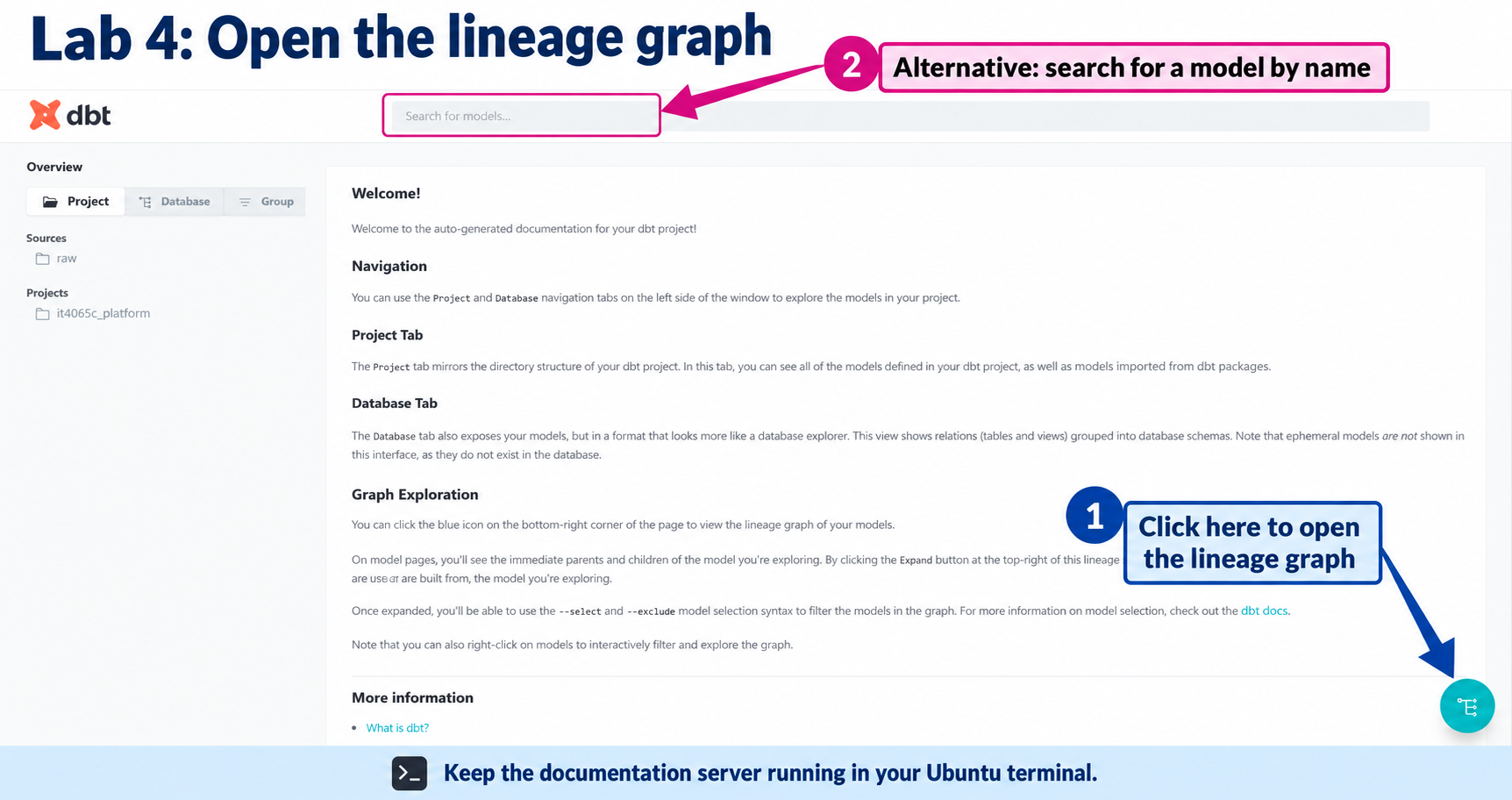
Annotated teaching illustration based on the instructor's screenshot. Browser toolbars and personal bookmarks have been removed. Button placement can vary with window size or version; the model search offers an alternative route.
Recommended route: use the focused graph below. Fallback / text alternative: use the linked model SQL files later in this step if you prefer text or the browser is unavailable. You only need one route; the alternatives are not extra work.
Focus the graph:
- In the open Lineage Graph, locate the
--selectfield along the bottom. If the filter bar is not visible, use the graph's expand control at the top-right. - Replace the selection text with the following value, keeping both plus signs. This is a graph filter, not a terminal command:
+stg_orders+
- Leave
--excludeempty and click Update Graph. Keep the resource and package filters at their defaults, using the instructions below.
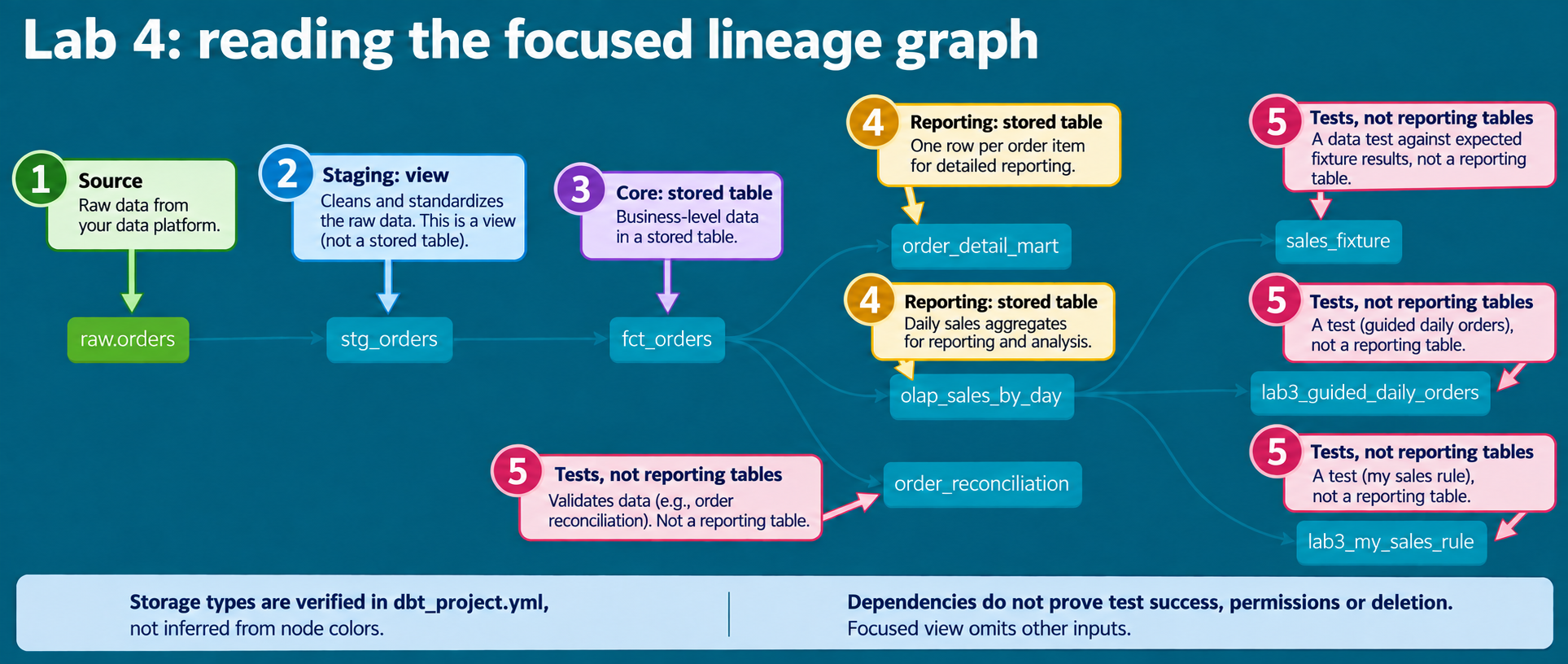
Annotated teaching illustration based on the supplied screenshot, not unmodified
execution evidence. Storage types come from dbt_project.yml, not node colors.
The text below provides equivalent paths; tests are not reporting tables or proof
of successful execution.
The leading + includes upstream dependencies and the trailing + includes
downstream dependents of stg_orders. You should see raw.orders, stg_orders,
fct_orders, both reporting models and dependent tests. Other inputs, such as
customer and item data, are hidden by this filter, not removed from the project.
To return to the full view, clear the --select field and click Update Graph.
Optional reference: the order paths explained
In the graph, find `raw.orders` on the left. Follow its arrows to `stg_orders`, then `fct_orders`. From there, follow the two branches to `olap_sales_by_day` and `order_detail_mart`. The annotated paths below show where to look; inspect the same connections in your own graph. 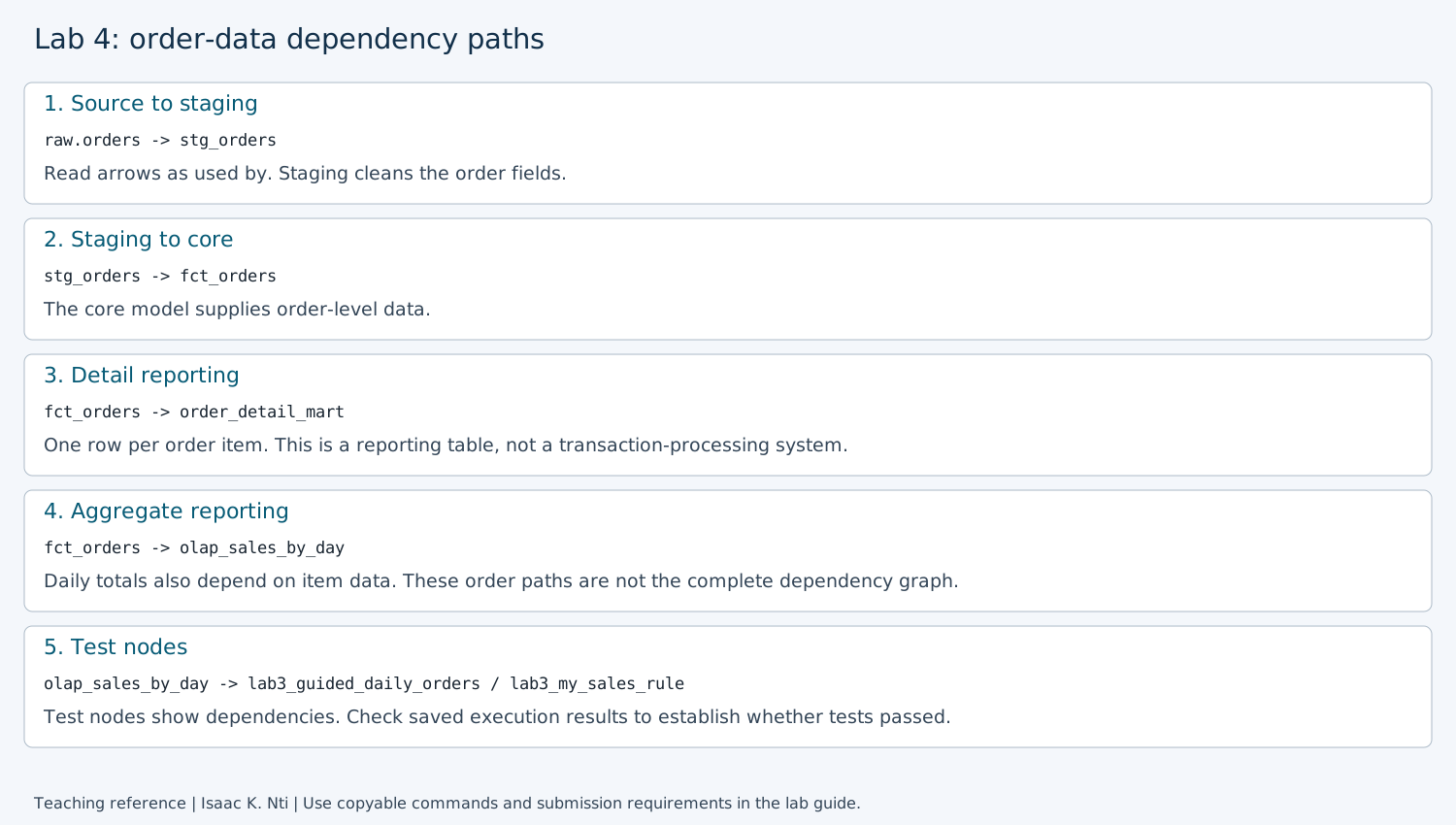 *Annotated dependency reference, not evidence of a new execution. The text paths below provide the same guidance.*The lab3_guided_daily_orders and lab3_my_sales_rule nodes are tests, not
reporting tables. Their presence documents dependencies; it does not show whether
they passed. Your saved Lab 3 test results provide that execution evidence.
Other test nodes may also be visible. You do not need to describe every node or
recreate the graph.
Use these paths as a guide, and check them against the model references:
raw.orders -> stg_orders -> fct_orders -> olap_sales_by_day
raw.orders -> stg_orders -> fct_orders -> order_detail_mart
The arrows mean “used by.” These are order-data paths, not a complete graph: the
marts also use other models, including item data. For a text-based route, read
order staging,
the order model,
the daily mart
and the detail mart.
source identifies raw input and ref identifies another model used by the query.
Whichever route you choose, inspect at least one source() or ref() expression
in a linked model SQL file. For example, ref('fct_orders') identifies
fct_orders as an input model. You do not need to explain every expression.
Keep for submission: record the two paths, the SQL file and expression you inspected, and one sentence explaining which input that dependency identifies. A cropped lineage screenshot is an optional alternative to the text paths; keep the explanatory sentence either way. If the browser route failed, state that you used the supplied SQL files instead. Then continue to step 3 to complete your private lifecycle decision log.
3. Complete your private decision log
When finished browsing, return to the server terminal and press Ctrl+C to stop it and regain the shell prompt. Expected:
Documentation server stopped. You can continue with the lab.
A terminal may also display ^C, meaning you pressed Ctrl+C. Wait for the shell
prompt before entering the next command.
Then run these commands one at a time:
mkdir -p .local
cp -i labs/core/lab04-lineage-lifecycle/_turnin_template.md .local/lab4-decision-log.md
nano .local/lab4-decision-log.md
A successful copy is normally silent. If prompted to overwrite existing work,
answer n to keep it, then review your existing log. Edit only the private copy.
Expected in the editor: a worksheet with execution-evidence fields, a completed Raw example,
three vertically labeled stage sections with supplied model names and grains,
three retention questions and an assistance-disclosure field. This is written work, not SQL to execute.
First fill section 0 from your saved command output and prediction notes.
Keep the Raw section labeled as the supplied example. Complete the Staging, Core and
Marts sections for the path ending at olap_sales_by_day, replacing each bracketed
answer prompt with your explanation. Record your checked paths and explanatory sentence
in section 1 of the same worksheet so the evidence stays together:
| Worksheet label | What to write |
|---|---|
| Input and grain | Model/source name and what one row represents |
| Transformation | What changes at that stage; raw input can say “stored source records” |
| Quality check | A relevant observed test, or a proposed check clearly labeled as proposed |
| Permitted role | The role you propose should use the data; label it proposed unless access was actually tested |
| Evidence and limitation | The file, output or observation supporting the entry, and what it cannot establish |
The Raw example uses lab2_seed.sql as source-fixture evidence; it does not prove
access restrictions. Apply that distinction to your three stage responses.
For quality checks, use a specifically evidenced observation or label your
recommendation Proposed. No new test is required for each stage. A permitted
role may be a business responsibility or database role; explain which you mean
and why it fits. Label access Proposed unless you tested it.
Type your short answers underneath each label. No wide table or separator editing is required. You may use a word processor or table if you prefer the same content in another format; submit only one version.
Save with Ctrl+O, Enter, then exit with Ctrl+X. This saves your notes; it does not execute SQL. No screenshot of the editor is required.
4. Explain the retention scenario
This is a written scenario: do not delete data or run a refresh for this task.
Suppose an approved retention decision removes an order from raw.orders.
Use this reasoning sequence to organize your response:
Dependency -> view or stored table -> what could remain
-> proposed refresh -> verification evidence -> limitation
Consult dbt_project.yml using the link below to identify storage types; graph
colors alone do not establish them. Complete the three labeled answer spaces in
section 3 of your private worksheet:
- Which downstream stored tables could still contain the order or its contribution to a total? Name the affected models along the paths you traced.
- What would you propose refreshing, in what dependency order, and what query or comparison would you use to check the result?
- What remains unproven? Include one action a lineage diagram cannot prevent, such as an authorized reader exporting a copy, and the separate evidence needed.
The supplied project configuration sets staging models to views and core/mart models to stored tables. A view reads its underlying data when queried; a stored table does not automatically rebuild when an upstream record changes. Exports and backups need separate investigation. Describe your refresh and checks as proposed, not demonstrated deletion.
Investigation complete: retain the checked paths, the supplied Raw example and three completed stage sections and these three scenario answers. They are the interpretation and transfer work for this lab; no separate repeated essay is required.
Submit
Optional: use the local report checker after writing your submission. Replace the path below with your actual private report filename. Warnings are suggestions, not grades or new submission requirements.
.venv/bin/python scripts/report_checks/lab04.py .local/lab4-decision-log.md
See the optional Lab 4 sample submission for the expected structure, selected walkthrough observations and level of detail. Complete your own decision log; the sample is not an additional assignment.
Submit your completed private .local/lab4-decision-log.md, or the same content
in your instructor's requested document format. Check that it contains:
- Section 0: command, relevant PASS lines, prediction or honest timing note, and comparison with the actual result.
- Section 1: both checked paths and one named SQL dependency with its explanation.
- Section 2: the supplied Raw example and your three completed stage sections.
- Section 3: three retention answers, including proposed verification and limits.
- Section 4: assistance disclosure or
None.
This is one submission; no separate shared template or repeated essay is required. A screenshot is optional. Crop personal details and omit configuration secrets. Submit privately through the LMS, or retain locally for self-study. Technical success alone does not complete the reasoning task.
Rubric: correct execution/evidence 25%; accurate interpretation 35%; transfer and tradeoff reasoning 30%; clarity and evidence limitations 10%.
Recovery
Use the setup troubleshooting table. Read errors before retrying; never delete tests or change authentication to make a result pass. There is no automatic destructive reset. For an isolated new start use a new DB/user pair.
Author: Isaac K. Nti. Citation and reuse terms.